The Sovereignty of the Local Model
In the academic landscape of 2026, the reliance on cloud-based AI providers like OpenAI or Anthropic has become a double-edged sword. While these platforms offer immense power, they come at the cost of monthly subscriptions, data privacy concerns, and the requirement of a constant, high-speed internet connection. For the modern student, Local LLMs (Large Language Models) have transitioned from a niche hobbyist pursuit to a fundamental tool for academic sovereignty.
Running AI locally means your research, your draft essays, and your private data never leave your machine. Thanks to the breakthrough in NPU (Neural Processing Unit) integration and the refinement of 4-bit and 6-bit quantization, the laptop you bought for general coursework is now capable of running models that rival the GPT-4 class of 2024. This guide provides the technical roadmap to turning a sub-$800 machine into a private intelligence powerhouse.
The 2026 Hardware Baseline: What You Actually Need
The hardware landscape has shifted significantly. In 2026, we no longer rely solely on the GPU for inference. The rise of the 'AI PC' means most budget laptops now come equipped with dedicated silicon designed specifically for matrix multiplication.
1. Memory (RAM): The Non-Negotiable
While 8GB was the standard for years, 16GB of Unified Memory or DDR5 RAM is now the absolute floor for local AI. Because LLMs load their entire weight set into memory, your RAM capacity dictates the size of the model you can run. If you are shopping for a budget machine, prioritize RAM over CPU clock speed.
2. The NPU Revolution
Whether you are using an Intel Core Ultra (Series 3), an AMD Ryzen AI processor, or an Apple M4, your laptop likely has an NPU. These chips are optimized for the low-power, high-efficiency math required for LLM inference. In 2026, tools like Ollama and LM Studio have been optimized to offload specific layers to these NPUs, significantly reducing battery drain.
| Hardware Tier | Recommended Models | Expected Tokens/Sec |
|---|---|---|
| Ultra-Budget (8GB RAM) | Phi-4 (3.8B), Gemma 3 (2B) | 25-40 t/s |
| Student Standard (16GB RAM) | Llama 4 (8B), Mistral vNext (7B) | 15-25 t/s |
| Performance Budget (32GB RAM) | Command R-Light, Llama 4 (20B Quantized) | 8-12 t/s |
The Software Stack: Simplified for 2026
Gone are the days of complex Python environment configurations and broken CUDA drivers. The ecosystem has consolidated into user-friendly wrappers that handle the heavy lifting of model quantization and cross-platform acceleration.
Ollama: The Industry Standard
Ollama remains the gold standard for students. It acts as a background service that manages models with a simple command-line interface, but it also powers many of the sophisticated GUIs you'll likely use. It automatically detects your hardware—whether it's an integrated Intel Arc GPU, a Radeon iGPU, or an Apple M-series chip—and optimizes the model layers accordingly.
Jan.ai and LM Studio: The Desktop Experiences
For those who prefer a ChatGPT-like interface, Jan.ai and LM Studio provide a seamless experience. These applications allow you to browse a 'model store' (usually pulling from Hugging Face), download a model, and start chatting in minutes. In 2026, Jan.ai has introduced an 'Academic Mode' which automatically indexes your local PDFs to provide Retrieval-Augmented Generation (RAG)—letting you chat with your textbooks offline.
Understanding Quantization: The 'Secret Sauce'
How do we fit a massive model into a budget laptop? The answer is Quantization. Most frontier models are trained at 16-bit precision (FP16). However, researchers have found that you can compress these models down to 4-bit (Q4_K_M) or even 1.5-bit with surprisingly little loss in logic and reasoning capabilities.

For a student on a budget, the Q4_K_M GGUF format is your best friend. It offers the perfect balance: it reduces the model size by nearly 70% while maintaining roughly 98% of the intelligence of the full-sized model. This allows an 8-billion parameter model to fit comfortably within 5-6GB of RAM, leaving plenty of room for your OS and web browser.
Strategic Implementation: Your First Local RAG System
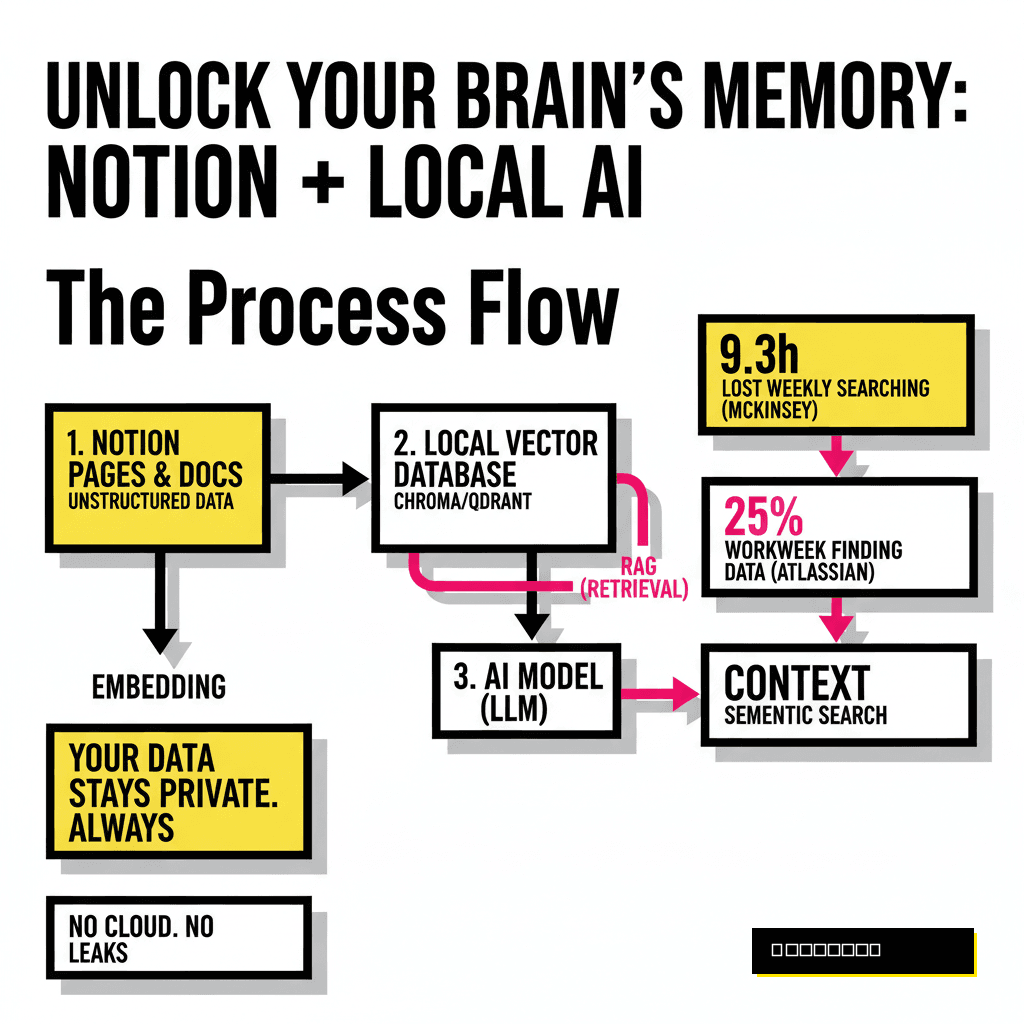
The real power of local AI isn't just chatting; it's Retrieval-Augmented Generation (RAG). This is the process of giving the AI access to your specific notes and lecture slides. Because this happens locally, you can feed it sensitive research or unpublished drafts without fear of your intellectual property being used to train the next version of a commercial model.
Step-by-Step: Setting Up Your Private AI Lab
- Install Ollama: Visit ollama.com and download the 2026 stable release. It will automatically detect your NPU or iGPU.
- Pull a Student-Friendly Model: Open your terminal and type
ollama run llama4:8b-q4_K_M. This model is specifically tuned for reasoning and summarization. - Connect a Frontend: Download Jan.ai. In the settings, point it to your Ollama server. This gives you a clean UI with history, folders, and local file indexing.
- Configure System Prompts: Set a system prompt like: "You are a research assistant for a [Your Major] student. Use academic tone, cite provided context, and prioritize logical consistency over creative flair."
Optimization Tips for Budget Machines
If you find your laptop fans spinning too loudly or the text generation feels sluggish, consider these three optimizations:
- Reduce Context Window: By default, some models try to remember 32,000 tokens. Setting this to 8,000 or 12,000 in your settings will drastically reduce RAM usage.
- Use 'Small Language Models' (SLMs): Models like Microsoft’s Phi-4 or Google’s Gemma 3 are designed to be 'small but mighty.' They punch far above their weight class in coding and logic tasks while using less than 4GB of RAM.
- Keep it Plugged In: Even with NPUs, local inference is power-intensive. Most laptops will throttle the NPU performance by 30-50% when running on battery to preserve life.
"The transition to local AI is not just a technical choice; it is a declaration of digital independence. In an era of algorithmic surveillance, the student who runs their own model is the only one who truly owns their thoughts." — Dr. Aris Thorne, Proposia Intelligence Report 2025
Conclusion: The Future is Local
As we move further into 2026, the gap between cloud-based 'God-models' and local 'Specialist-models' is closing. For the cost of a few months of an AI subscription, a student can invest in a slightly better RAM configuration and run private, unlimited, and uncensored AI for the duration of their degree. The tools are ready, the hardware is capable, and the privacy benefits are undeniable. It is time to bring your intelligence home.